Plenty of ranking problems that look like content problems are really structure problems. A key service page sits five clicks deep behind a blog archive. Two category pages chase the same query and split the signals between them. A new guide goes live with no internal links pointing to it, and Google takes weeks to notice.
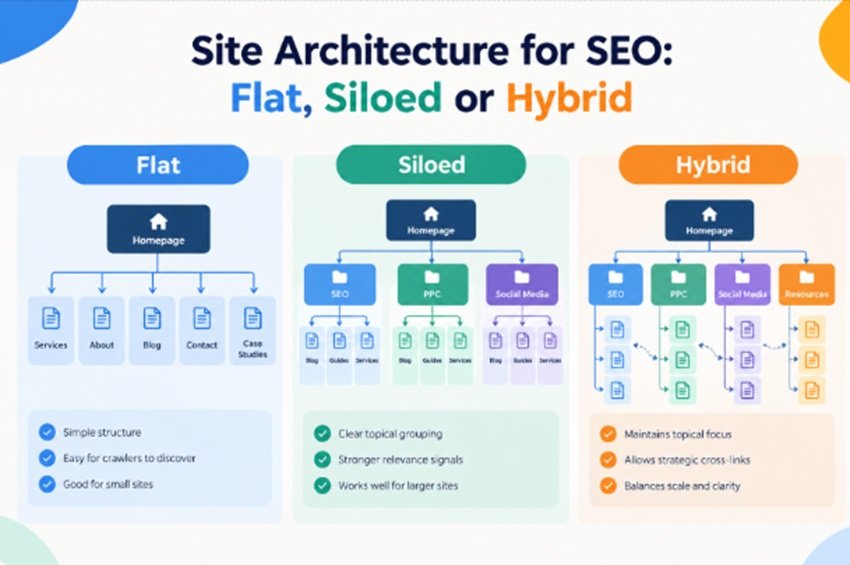
Site architecture SEO is the work of fixing that: deciding how pages are grouped, how they link to one another and how far each one sits from the homepage. Three broad models are available (flat, siloed, and hybrid), and each trades off crawl efficiency for topical clarity.
This guide explains how each model works, where it helps and where it fails, and gives you a practical way to choose and build the right structure for your site.
What Site Architecture Means for SEO
Site architecture is the way your pages are organised and connected. It covers navigatiosite architecture seon, URL paths, category groupings, breadcrumbs and, above all, internal links. Good website structure SEO makes that organisation obvious to people and crawlers alike, so both can find what matters and understand how it fits together.
The Three Signals Your Structure Sends to Google
Every site architecture SEO decision affects at least one of three things:
- Discovery. Google finds most new pages by following links. A page with no internal links pointing to it (an orphan page) may only be found through your XML sitemap, and it will usually be treated as unimportant.
- Importance. Pages linked from the homepage and main navigation receive more internal link equity and tend to be crawled more often. Pages buried deep receive less of both.
- Relationships. The pattern of links tells Google how topics connect: that a technical SEO audit page belongs with your SEO services, not beside social media management.
URL Folders vs Internal Links
A common assumption is that the URL path defines the architecture. It helps, but it is not what Google leans on most. Google’s John Mueller has said that Google doesn’t care much about folder structure and focuses on internal linking, essentially how quickly a page can be reached from the homepage.
In practice, a path like /services/seo/technical-audit/ is a useful label for users and for your own reporting. But if that page is only reachable through a paginated blog tag, the tidy URL won’t save it. Treat URLs as labels and links as the real architecture.
Flat Site Architecture
In a flat structure, almost every page is reachable within a few clicks of the homepage, often summarised as “three clicks or fewer”. The homepage and main menu link out broadly, and there are few intermediate layers between the top of the site and its individual pages.
Where a Flat Structure Works Well
Flat architecture suits sites where there simply isn’t much hierarchy to express:
- Small business and brochure sites with a few dozen pages.
- Single-topic sites where every page supports the same core subject.
- New sites with few backlinks, where you want homepage equity to reach every page quickly.
For a consultancy with eight service pages and a handful of case studies, flat is usually the right answer from a site architecture SEO point of view. Adding category layers that exist only to look organised just pushes important pages further from the homepage.
Where It Breaks Down
Flat structure does not scale gracefully. Once a site grows to hundreds of pages, “link everything from everywhere” turns into mega-menus with a hundred-plus links and footers that read like sitemaps. Each individual link carries less weight, and users struggle to find anything.
There is also a signalling problem. Mueller has noted that with a very flat structure, Google finds it harder to tell which pages matter more, because they all appear equally important. You lose the hierarchy that explains how topics relate. At that point, site architecture SEO needs more than proximity to the homepage.
Siloed Architecture: How an SEO Silo Works
An SEO silo groups content into distinct topical sections. Each section has a top-level hub page with supporting pages beneath it. Links flow up and down inside the section and, in the strict version of the model, rarely cross into other sections. It is one of the oldest ideas in site architecture SEO, and still one of the most misunderstood.
Physical Silos vs Virtual Silos
Physical silos are expressed through URL directories: everything about paid media lives under /ppc/, everything about search under /seo/. Virtual silos are defined by internal links, regardless of what the URLs look like. Most well-built silos use both, but the virtual layer, the links, is what does the real work.
What Silos Do Well
A well-planned SEO silo brings genuine benefits:
- Sharper topical focus. A hub supported by tightly related pages makes it clear what that section of the site is about.
- Less keyword cannibalisation. When each subtopic has one designated home, you are less likely to publish three pages competing for the same query.
- Visible content gaps. Mapping a silo quickly shows which subtopics you have not covered.
- Cleaner reporting. Folder-level groupings make it easy to track performance by section in Google Search Console and GA4.
The Problem With Strict Silos
The strict version of the SEO silo, where you never link across silos, creates as many problems as it solves. Real topics overlap. A guide on internal linking is relevant to technical SEO and to content strategy. Blocking that link makes the page less useful to readers and hides a genuine relationship from Google.
Google’s own SEO Starter Guide describes sites that link related pages naturally; it does not recommend walling topics off. Strict silos also distribute equity unevenly: a section that earns backlinks gets stronger, while a neighbouring section full of commercial pages stays starved because nothing is allowed to link across to it.
Hybrid Architecture: Shallow Paths, Topical Hubs
A hybrid structure takes the useful part of each model: the shallow click depth of flat architecture and the topical grouping of silos, plus deliberate cross-links where topics genuinely overlap. It is close to what many SEOs call a hub-and-spoke or topic-cluster model.
What a Hybrid Structure Looks Like
Here is a simplified example for a digital marketing agency:
- Homepage links to the main service hubs and a small set of priority pages.
- SEO services hub links to technical SEO, local SEO, link building and internal linking service pages.
- Supporting guides (such as this one) link up to the relevant service hub and across to closely related guides.
- Cross-hub bridges connect topics that users naturally move between, such as a content strategy guide linking to an internal linking guide.
- Breadcrumbs on every page show the path back to the hub and the homepage.
Every priority page stays within three or four clicks of the homepage, yet the link pattern still makes each topic’s boundaries clear.
Why Most Growing Sites End Up Here
Hybrid is less a compromise than a reflection of how sites actually grow. You start flat, add hubs as topics accumulate, and cross-link where readers naturally move between subjects. For most businesses with more than a handful of service lines, hybrid is the sensible default for site architecture SEO.
Flat vs Siloed vs Hybrid: Side-by-Side Comparison
The table below summarises how the three models compare on the factors that matter most for site architecture SEO.
| Factor | Flat | Siloed | Hybrid |
| Best for | Small, single-topic sites | Large sites with clearly separate topics | Growing sites with several related topics |
| Typical click depth | Very shallow | Can get deep without care | Shallow for priority pages |
| Topical signals | Weak; pages look equally important | Strong within each section | Strong, with realistic overlap |
| Scalability | Poor beyond a few hundred pages | Good | Good |
| Maintenance effort | Low | High (needs link governance) | Moderate |
| Main risk | Bloated navigation, no hierarchy | Starved sections, blocked useful links | Cross-links added without a clear reason |
How to Choose the Right Structure for Your Site
There’s no single best structure; there is a best fit for your size, topics and commercial model. Good site architecture SEO starts with an honest answer to the questions below.
Four Questions to Answer First
- How many indexable pages do you have, and how many will you have in 18 months? Plan for where the site is going, not where it is today.
- How many distinct topics or services do you cover? One core topic points to flat; several clearly separate ones point to hubs.
- Where does revenue come from? A few high-value service pages need to sit close to the homepage and receive links from your informational content.
- Who will maintain it? Silo and hybrid models need someone who owns internal linking rules as new content is published.
Recommended Structure by Site Type
| Site type | Recommended model | Why |
| Local service business (up to ~30 pages) | Flat | Few pages, one core offer; keep everything one or two clicks away. |
| B2B or agency site with several service lines and a blog | Hybrid | Service hubs give topical clarity; guides feed equity to commercial pages. |
| Ecommerce store with a deep catalogue | Hybrid with category-led sections | Categories act as hubs; facets and filters need crawl controls. |
| Publisher or multi-topic content site | Silo-leaning hybrid | Strong topical sections, with cross-links where stories overlap. |
| Bilingual Arabic/English UAE site | Hybrid, mirrored per language | Each language folder repeats the same hub logic, linked with hreflang. |
How to Build a Hybrid Site Architecture, Step by Step
Whether you are planning a new site or restructuring an existing one, the process is broadly the same.
Step 1: Crawl and Map What You Have
Run a full crawl with a tool such as Screaming Frog or Sitebulb. Export click depth, inlink counts and indexability for every URL. Compare the crawl against your XML sitemap and Search Console data to find orphan pages that exist but receive no internal links.
Step 2: Group Pages by Topic and Intent
Cluster your pages and target keywords by topic and search intent. Each intent should have one primary page. Where two pages compete for the same query, decide which to keep and whether to merge, redirect or re-angle the other.
Step 3: Define Hubs and Their Supporting Pages
Choose one hub per core topic. For commercial topics this is usually the main service or category page; for informational topics it may be a pillar guide. List the supporting pages that belong under each hub and note any that serve two hubs.
Step 4: Set Navigation, URL and Breadcrumb Rules
Link the main navigation to hubs rather than to every page. Use subfolders that reflect the hub grouping where it is practical, add breadcrumbs to every page below the homepage, and mark them up with BreadcrumbList structured data. Avoid changing URLs purely for tidiness; only change them when the benefit is clear.
Step 5: Wire the Internal Links
Apply the linking rules in the next section: hub to spoke, spoke to hub, relevant siblings and a small number of deliberate cross-hub bridges. Prioritise links from pages that already attract backlinks or traffic towards the commercial pages you most need to rank.
Step 6: Redirect, Resubmit and Monitor
Map 301 redirects for every URL that changes, then update internal links to point at the final URLs rather than relying on redirects. Resubmit your XML sitemap, and watch crawl and indexing data closely for the following weeks. This is the stage where site architecture SEO projects most often slip, because the launch feels like the finish line.
Internal Linking Rules That Hold the Structure Together
Architecture only exists through the links that express it. These rules keep a hybrid structure coherent as it grows:
- Hub to spoke: every hub links to all of its supporting pages.
- Spoke to hub: every supporting page links back to its hub with descriptive anchor text.
- Sibling links: supporting pages link to closely related pages in the same group where a reader would genuinely want to continue.
- Cross-hub bridges: add them sparingly and only where the topics truly overlap.
- Equity routing: pages that earn backlinks should link to priority commercial pages.
- Crawlable links: use standard HTML links with an href attribute. Google’s link guidelines note that it can only reliably crawl links built this way, not links that rely on JavaScript click events.
- Natural anchor text: describe the destination clearly and vary the wording rather than repeating one exact-match phrase.
Internal linking is where most site architecture SEO work succeeds or stalls. A clean diagram means little if the links on the pages don’t reflect it.
Site Architecture Considerations for UAE Websites
Businesses in the UAE often face two structural questions that generic guides skip: how to handle two languages, and how to target several emirates without creating thin, duplicated pages. Getting website structure SEO right here protects both rankings and user experience.
Bilingual Arabic and English Sites
Keep each language in its own subfolder, such as /en/ and /ar/, rather than mixing languages on one URL. Mirror the same hub structure in both, connect equivalent pages with hreflang annotations, and make the language switcher link to the equivalent page rather than to the other homepage.
Arabic pages need proper right-to-left layouts and content written or edited by native speakers. A thin, machine-translated Arabic mirror adds pages to your site architecture SEO footprint without adding value, and it can drag down how the whole section is perceived.
Emirate and Area Location Pages
If you serve Dubai, Abu Dhabi and Sharjah, place location pages under the relevant service hub or a dedicated locations hub, and give each one genuinely local content: the teams, projects, service areas or FAQs that differ by emirate. Dozens of near-identical “service in [area]” pages resemble doorway pages, which Google’s spam policies specifically warn against.
Common Site Architecture Mistakes
These are the problems that show up most often in structural audits:
- Orphan pages that receive no internal links, often older landing pages or blog posts removed from navigation.
- Buried commercial pages that are only reachable through the blog or a footer link.
- Mega-menus that link to every page and flatten all hierarchy.
- Tag and archive bloat, where thin tag, author and date pages outnumber real content.
- Over-strict silos that block useful links between related topics.
- Redirect chains left behind after previous restructures.
- Links hidden behind scripts, such as “load more” buttons or tabs that crawlers cannot follow.
- Changing URLs without need, which introduces redirect risk for no real gain.
Most of these are easy to spot in a crawl. The harder part is agreeing on the target structure first, so that fixes point in the same direction.
How to Tell Whether Your Architecture Is Working
Rankings take time to respond, so track leading indicators alongside them. Useful measures for site architecture SEO include:
- Click depth distribution: the share of priority pages within three clicks of the homepage.
- Inlinks to priority pages: whether commercial pages now receive more internal links from relevant content.
- Orphan page count: this should fall towards zero for pages you want indexed.
- Search Console Page indexing report: watch the “Discovered – currently not indexed” and “Crawled – currently not indexed” groups for your key sections.
- Search Console Crawl stats: look for steadier crawling of important sections after changes settle.
- Performance by section: impressions and clicks grouped by hub or folder, compared against the period before the change.