Internal linking is one of the few ranking levers a website owner fully controls, yet it is usually the first thing skipped when a content calendar gets tight. Teams will spend weeks chasing backlinks or polishing on-page copy, then publish a new article and forget to connect it to anything else on the site. The page sits there, technically live, practically invisible to both readers and Google’s crawlers.
This guide covers what internal linking actually does for rankings, how to build an internal link strategy that holds up as a site grows, and the specific mistakes that quietly cap how far a page can rank. Whether you run a blog, an e-commerce catalogue, or a service business website, the same core principles apply.
What Is Internal Linking (And Why Most Sites Get It Wrong)
Internal linking is the practice of connecting one page on a website to another page on the same domain using a hyperlink. A blog post linking to a related guide, a product page linking to a buying guide, or a service page linking to a case study are all common examples.
Most sites treat this as an afterthought because it produces no immediate, visible result the way a new blog post or a paid campaign does. But internal links do three jobs at once: they help search engines discover new content, they distribute ranking authority from strong pages to weaker ones, and they guide readers toward the next logical step in their journey. Skip internal linking and all three of those jobs fall to chance.
How Internal Linking Actually Affects Google Rankings
Crawl Budget and Discovery
Search engines find new and updated pages by following links. A page with no internal links pointing to it, known as an orphan page, can take far longer to get crawled, or may never get indexed at all. The deeper a page sits from the homepage in terms of clicks, the less frequently Googlebot tends to revisit it, which slows down how quickly content updates get reflected in search results.
Passing Authority Between Pages
Not every page on a site earns backlinks. A well-planned internal link strategy takes pages that do attract external links or strong engagement and channels some of that authority toward newer or commercially important pages through contextual links. This is one of the most reliable ways to help a page rank without waiting on outside link building.
Context and Topical Relevance Signals
The anchor text used in an internal link tells Google what the destination page is about. A link with descriptive, relevant anchor text reinforces the target page’s topic and helps search engines understand how pages on a site relate to one another. Over time, consistent internal linking around a topic builds what is often called topical authority: a signal that a site covers a subject thoroughly enough to be trusted for it.
Building An Internal Link Strategy That Works
A strong internal link strategy is not something you bolt on after publishing. It should be planned alongside the content itself, then maintained as the site grows.
Map Your Site Into Pillars and Clusters
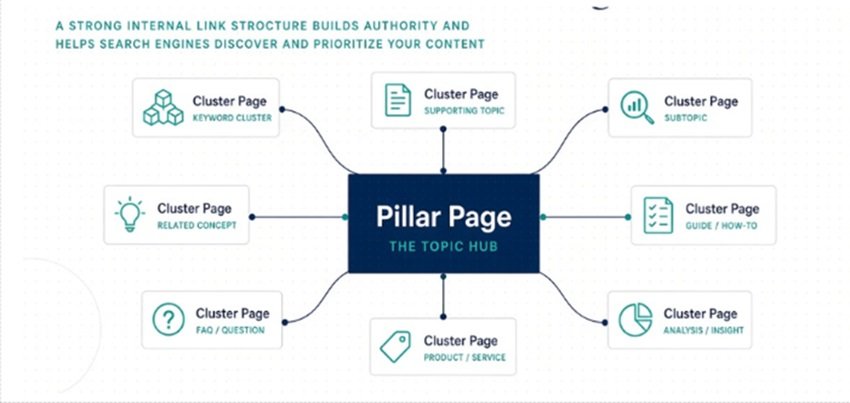
Group content around broad pillar topics, then build supporting cluster pages that go deeper into specific subtopics. Each cluster page links back to its pillar, and the pillar links out to every cluster page beneath it. This structure gives both readers and search engines a clear map of how a topic is organised, and it is one of the most effective internal linking patterns for building topical relevance.
Identify Your Priority Pages
Before adding links, decide which pages matter most commercially, whether that is a service page, a category page, or a high-intent product page. These priority pages should receive internal links from multiple relevant articles, using natural anchor text rather than the same phrase every time.
Decide How Many Links a Page Needs
There is no fixed rule for internal linking volume, but a useful starting point is two to five genuinely relevant contextual links per thousand words of content, plus any structural navigation links. The right number depends on page length and purpose more than a formula. Adding links purely to hit a quota tends to produce a page that reads as cluttered rather than helpful.
Anchor Text Best Practices For Internal Links
Anchor text is the visible, clickable text of a link, and it carries more SEO weight than most site owners realise.
- Use descriptive, specific anchor text instead of generic phrases like “click here” or “read more.”
- Vary the wording across links pointing to the same page rather than repeating one exact phrase every time; this keeps a link profile looking natural rather than manipulated.
- Keep anchor text short enough to read naturally in a sentence, usually two to six words.
- Match the anchor text to what the destination page is actually about. Do not link a phrase to a page that does not answer it.
- Avoid linking the same anchor text to two different pages, which confuses both users and search engines about which page should rank for that phrase.
Where To Place Internal Links For Maximum Impact
Not all internal links carry equal weight. Links placed within the main body of an article, where a reader is actively engaged with the topic, tend to carry more relevance than links buried in a footer or a sidebar that repeats on every page.
Practical placement guidance:
- Early in the content, when a concept is first introduced and a related resource would genuinely help.
- Within a comparison or “how it works” section, where linking to a deeper guide adds context without breaking the reader’s flow.
- In a closing “related reading” or “next steps” block, pointing toward a logical follow-up page.
- From high-traffic, high-authority pages down to newer or underperforming pages that need a boost.
Avoid stacking several links together in one sentence. A reader who sees three or four blue links in a row is unlikely to click any of them, and it reads as a manipulated list rather than a natural internal link strategy.
Internal Linking For Service Businesses
For service-based websites, including agencies and businesses operating across the UAE market, internal linking has an added job: connecting informational content to commercial pages without making the transition feel forced. A blog post explaining a topic like this one, for example, can link naturally to a dedicated SEO services page once the reader understands why the subject matters, rather than pushing the link before any context has been given. This keeps the internal links SEO-friendly while still respecting how a reader actually moves through a decision.
Local and regional sites often have an additional layer of location or service-area pages. These benefit from internal links that connect a general service page to the specific location pages beneath it, so that both users and search engines can move cleanly between “what we do” and “where we do it.”
Common Internal Linking Mistakes To Avoid
- Publishing new content without linking to or from any existing pages, creating orphan pages that struggle to get indexed.
- Overusing exact-match anchor text across many links, which can look manipulative rather than natural.
- Linking to irrelevant pages simply to add more links, which weakens the contextual signal search engines rely on.
- Using only generic anchors like “click here,” wasting an opportunity to describe the destination page.
- Adding excessive links to a single page, which dilutes the value each individual link passes and overwhelms the reader.
- Never revisiting older content, so new pages stay disconnected from the rest of the site indefinitely.
- Linking to broken, redirected, or outdated pages that no longer serve the reader.
How To Audit Your Internal Links SEO Performance
An internal link strategy is not a one-time project. Content changes, pages get retired, and priorities shift, so a periodic audit keeps the structure working.
What to check:
- Orphan pages that have no internal links pointing to them.
- Pages buried more than three or four clicks from the homepage.
- Broken internal links or links pointing to redirected URLs.
- Anchor text patterns, checking for both generic phrases and over-repeated exact-match terms.
- Priority pages, confirming they receive enough contextual internal links from relevant content.
Tools such as Google Search Console’s Links report, Screaming Frog, or Ahrefs’ Site Audit can surface most of these issues directly, giving a clear list of pages to fix rather than requiring a manual page-by-page review.
Internal Linking Checklist
| Checklist Item | What to Verify |
| Orphan pages | Every important page receives at least one internal link from relevant content. |
| Click depth | Priority pages sit within three to four clicks of the homepage. |
| Anchor text | Descriptive and varied; no generic “click here” links, no repeated exact-match spam. |
| Link relevance | Each link genuinely relates to the surrounding content and the destination page. |
| Link placement | Contextual links sit within body copy, not only in navigation or footers. |
| Broken links | No links point to 404s, redirect chains, or outdated pages. |
| Pillar–cluster links | Cluster pages link to their pillar, and the pillar links out to its clusters. |
Internal linking will not fix a page that has no useful content, but it is one of the most reliable ways to help genuinely good content get discovered, understood, and ranked. A deliberate internal link strategy, reviewed periodically rather than set once and forgotten, tends to outperform an ad-hoc approach even when the underlying content is otherwise similar.
FAQs
1. What is internal linking in SEO?
Internal linking is the practice of connecting pages on the same website through hyperlinks, such as a blog post linking to a related guide or a service page linking to a case study. It helps search engines discover and understand content, and helps readers navigate to related information.
2. How many internal links should a page have?
There’s no universal number. A common starting point is two to five contextual links per 1,000 words for blog content, though page length, purpose, and how many genuinely relevant pages exist should guide the final count more than a fixed rule.
3. What is the difference between internal and external links?
Internal links point to another page on the same domain, while external links point to a page on a different website. Both matter for SEO, but internal links are the ones a site owner has full control over.
4. Does internal linking really affect Google rankings?
Yes. Internal linking affects how quickly pages get crawled and indexed, how ranking authority is distributed across a site, and how clearly search engines understand the topical relationship between pages, all of which influence rankings.
5. What anchor text should I use for internal links?
Use descriptive, natural anchor text that reflects the destination page’s topic. Avoid generic phrases like “click here,” and avoid repeating the exact same keyword-rich anchor text on every link to the same page.