If Google has never fetched a page, the page cannot rank. If Google has fetched it but decided not to store it, it cannot rank either. That sounds obvious, but many problems that look like ranking problems are really discovery or storage problems.
Crawling and indexing are the two processes between publishing a URL and seeing it in search results. This guide explains how Google crawls the web, where rendering fits in, what decides whether a page gets into the index and how to find the issues that hold pages back. It also covers several problems that come up often on UAE websites with bilingual content and geo-targeted setups.
Crawling and Indexing at a Glance
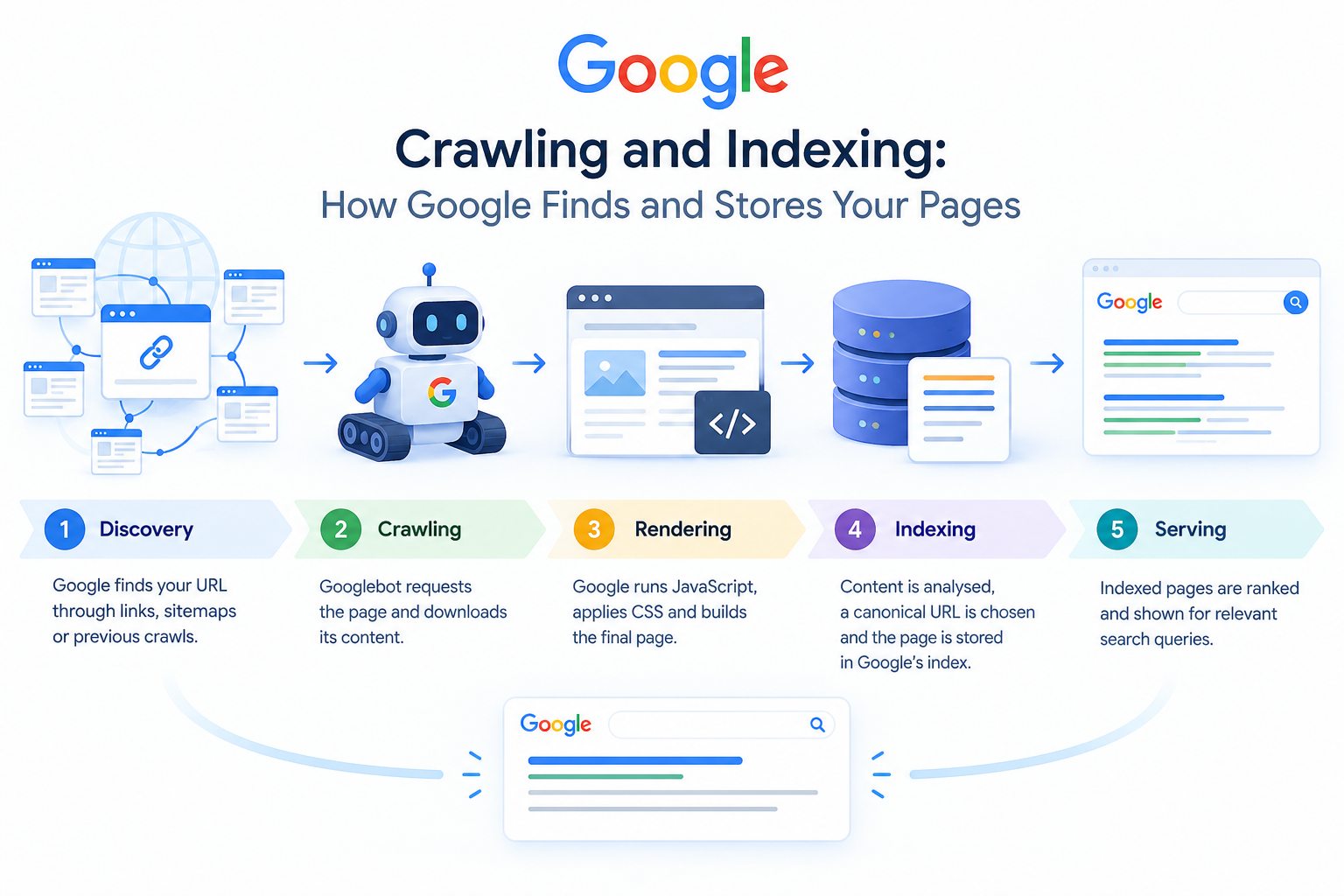
Crawling is when Googlebot discovers a URL and downloads its content. Indexing is when Google analyses that content and stores it in its index so it can be shown for relevant searches. Between the two, Google renders the page: it runs the JavaScript in a recent version of Chrome to see what a visitor would see.
| Stage | What happens | What commonly blocks it | Where to check |
| Discovery | Google learns a URL exists through links, sitemaps or previous crawls | Orphan pages, missing or broken sitemaps | Sitemaps report, URL Inspection |
| Crawling | Googlebot requests the URL and downloads the response | robots.txt rules, 5xx errors, timeouts, firewall or bot-protection blocks | Crawl Stats report, server logs |
| Rendering | Google runs JavaScript and builds the final page (DOM) | Blocked JS/CSS files, script errors, content that appears only after a click | URL Inspection → View tested page |
| Indexing | Content is analysed, a canonical URL is chosen and the page is stored | noindex, duplication, thin content, soft 404s | Page indexing report |
| Serving | Indexed pages are ranked and shown for relevant queries | Relevance, quality, competition | Performance report |
These stages run in order, and a failure at one stage stops every stage after it. That is why diagnosing crawling and indexing problems should always start with the earliest stage that could have failed.
How Google Crawls the Web
To understand how Google crawls, start with Googlebot, the name for Google’s main web crawler. It comes in two versions: Googlebot Smartphone and Googlebot Desktop. Google uses mobile-first indexing, so for most sites the smartphone crawler makes most of the requests. In practice, the mobile version of your page is the one that counts.
URL Discovery: How Google Finds Pages
Google has no central list of every page on the web. It finds URLs in three main ways:
- Links from pages it already knows: internal links on your own site and backlinks from other websites.
- XML sitemaps submitted in Search Console or listed in your robots.txt file.
- Previous crawls: URLs Google has already seen and comes back to check for changes.
Google says most pages in its results are found automatically by its crawlers, not submitted by hand. That makes internal linking the most reliable discovery method you control. An orphan page (one with no internal links pointing to it) depends entirely on the sitemap, and a sitemap entry is only a hint. This is why site architecture is so central to crawling and indexing. [INTERNAL LINK → site architecture / internal linking guide, if in sitemap]
What Happens During a Crawl Request
Before fetching a URL, Googlebot checks robots.txt to make sure it is allowed to crawl it. It then requests the page and records the HTTP status code, the response headers and the HTML. According to Google’s documentation, Googlebot processes only the first 2MB of an HTML file or other supported text file, and the first 64MB of a PDF. Anything after that limit is ignored. CSS and JavaScript files are fetched separately, and each has the same limit.
The status code determines what happens next:
| Status code | What Google does |
| 200 OK | Passes the content on for processing and possible indexing |
| 301 / 308 | Treats the redirect as a strong signal that the target URL should be the canonical |
| 302 / 307 | Treats the redirect as a weak signal and may keep the original URL in the index |
| 404 / 410 | Eventually drops the URL from the index. Genuine 404s do not hurt the rest of the site. |
| 429 / 500 / 503 | Temporarily slows crawling. If the errors continue, indexed URLs are eventually dropped. |
Crawl Rate and Crawl Budget
Google decides how much of a site to crawl based on two factors. Crawl capacity is how many requests your server can handle without slowing down. Crawl demand is how much Google wants to crawl, based on how popular your URLs are and how often they change. Together, these make up your crawl budget.
For most websites, crawl budget is not a real concern. Google’s own guidance says it matters mainly for very large sites (around a million or more unique pages), for medium-sized or larger sites (10,000+ pages) whose content changes daily, and for sites with many URLs listed as “Discovered currently not indexed”. Large e-commerce catalogues and property portals, which are common in the UAE, fit this description. On these sites, faceted navigation can create thousands of near-duplicate URLs that spread Google’s crawling too thinly.
Rendering: The Step Between Crawling and Indexing
Rendering is where Google turns raw HTML into the page a visitor actually sees. Google’s Web Rendering Service uses an up-to-date version of Chromium to run JavaScript, apply CSS and build the final DOM. Any content that appears only after JavaScript runs depends on this step. That can include product listings, reviews, internal links and even the main body text.
Why Rendering Can Delay Indexing
Rendering uses a lot of computing resources, so a page may wait in a queue after it is first crawled. For server-rendered pages this hardly matters, because the important content is already in the HTML response. For client-side JavaScript apps, the first HTML response can be almost empty. Google then has to render the page before it can see the content or find the links in it. That adds a dependency and another point where things can fail.
Rendering Approaches Compared
| Approach | How content reaches Googlebot | Indexing risk |
| Server-side rendering (SSR) | The full HTML is delivered in the first response | Low |
| Static site generation (SSG) | Pre-built HTML files are served from the server or CDN | Low |
| Client-side rendering (CSR) | JavaScript builds the content in the browser | Higher: content depends on successful rendering, and links can be missed |
| Dynamic rendering | Bots receive pre-rendered HTML while users get the JavaScript app | Google now calls this a workaround, not a long-term solution |
Rendering Mistakes to Avoid
- Blocking JavaScript or CSS in robots.txt. Google cannot render what it is not allowed to fetch.
- Using onclick handlers instead of <a href> links. Google reliably follows only proper anchor elements that have an href attribute.
- Hiding content behind interactions. Text that loads only after a click, a tab change or a scroll event may never be seen.
- Using fragment URLs (#) for separate pages. Google generally ignores the part of a URL after the #.
- Removing a noindex tag with JavaScript. If Google finds noindex in the original HTML, it may skip rendering altogether, so the script never runs.
How Indexing Works
After a page has been crawled and rendered, Google decides whether to store it. Good indexing SEO makes that decision easy. It gives Google a clean, unique, useful page and clear signals about which URL should represent it. This is the point where crawling and indexing separate: a page can be crawled successfully and still be left out of the index.
What Google Analyses During Indexing
During indexing, Google processes the text on the page, key HTML elements such as the title element, headings and image alt attributes, and any images, video and structured data. It also works out what language the page is in, which region it targets and how usable it is.
Canonicalization and Duplicate Content
When Google finds several pages with the same or very similar content, it groups them together and chooses one canonical URL to represent the group. Its signals include rel=”canonical” tags, redirects, internal links, whether a URL is in the sitemap and a preference for HTTPS. Your canonical tag is a strong hint, but Google can choose a different URL if the other signals point elsewhere. This is a common cause of the Search Console status “Duplicate, Google chose different canonical than user”.
Indexing Is Not Guaranteed
Google says plainly that not every page it processes will be indexed. It often crawls these pages and then leaves them out:
- thin pages
- near-duplicates
- auto-generated location pages where only the city name changes
- low-value parameter URLs
This is a quality decision, not a technical fault, so resubmitting the page will not fix it. [INTERNAL LINK → content/SEO content writing service page, if in sitemap]
Crawling and Indexing Controls: What Each Directive Actually Does
The most costly crawling and indexing mistakes usually come from using the wrong control. Robots.txt, noindex and canonical tags do different jobs:
| Control | Affects crawling? | Affects indexing? | Best used for |
| robots.txt Disallow | Yes | No. A blocked URL can still be indexed without its content if other pages link to it. | Keeping crawlers out of low-value areas such as internal search results, carts and filter combinations |
| Meta robots noindex / X-Robots-Tag | No | Yes. The page is dropped after Google recrawls it. | Pages people need but search does not, such as thank-you pages and thin tag archives |
| rel=”canonical” | No | Influences which duplicate appears in results | Parameter versions, print versions and syndicated content |
| XML sitemap | Helps discovery | No | Listing the canonical, indexable URLs you want Google to find |
| 301 redirect | Sends crawlers to a new URL | Consolidates signals on the target | Moved or merged pages |
| Removals tool (Search Console) | No | Temporarily hides a URL from results for about six months | Urgent removals while a permanent fix is put in place |
A common mistake: do not block a URL in robots.txt and also add a noindex tag to it. If Google cannot crawl the page, it never sees the noindex instruction, and the URL may stay in the index. Also note that Google stopped supporting noindex rules inside robots.txt in 2019, and it ignores the priority and changefreq values in XML sitemaps. It does use lastmod dates when they are consistently accurate.
How to Check Crawling and Indexing Status in Google Search Console
Search Console gives you the most direct view of crawling and indexing from Google’s side. Four reports cover most of what you need.
URL Inspection Tool
Inspect a single URL to see:
- whether it is indexed
- when it was last crawled
- which crawler was used
- the canonical URL Google selected
- whether indexing is allowed
“Test live URL”, followed by “View tested page”, shows the rendered HTML and a screenshot. This is the quickest way to check whether Google can see your JavaScript content. You can also request indexing here, but that is a request, not a guarantee.
Page Indexing Report
This report lists every URL Google knows about as indexed or not indexed, with a reason for each. Two statuses cause the most confusion:
- Discovered currently not indexed: Google knows the URL exists but has not crawled it yet. This often happens when server capacity is limited or when Google sees the page as low priority. It is common on large sites with weak internal linking.
- Crawled currently not indexed: Google fetched the page but chose not to index it. This usually points to a quality or duplication issue rather than a technical block.
Crawl Stats Report
You can find this report under Settings. It shows total crawl requests, download size and average response time. It also breaks requests down by response code, file type, purpose (discovery or refresh) and Googlebot type. If average response time goes up while crawl requests go down, your server’s performance is probably limiting how much Google crawls.
Sitemaps Report
This report shows whether Google could read your sitemap and how many URLs it found in it. Compare the URLs in your sitemap with the URLs that are indexed to find templates or site sections that are underperforming.
A Step-by-Step Crawling and Indexing Audit
When pages are missing from search, check each stage in order. This sequence catches most crawling and indexing problems without guesswork, and it doubles as a basic indexing SEO checklist.
- Confirm whether the page is indexed. Use URL Inspection, not a site: search. A site: search does not give a reliable count of indexed pages.
- Check robots.txt. Make sure robots.txt does not block the URL or its important JavaScript and CSS files. The robots.txt report in Search Console shows how Google read the file.
- Check the status code. The page should return a 200 to Googlebot. Look out for redirect chains, soft 404s and intermittent 5xx errors.
- Check indexability signals. Look for noindex in both the meta tags and the HTTP headers. Make sure the canonical points to the page itself, unless you deliberately point it elsewhere.
- Compare the raw HTML with the rendered HTML. If important content or links appear only after rendering, consider server-side rendering for key templates.
- Review internal links. The page should be linked from relevant, crawlable pages within a few clicks of the homepage.
- Audit the sitemap. List only canonical, indexable URLs that return a 200, with accurate lastmod dates.
- Analyse server logs. Logs show which URLs Googlebot actually requests and how often. User-agent strings are easy to fake, so verify Googlebot with a reverse DNS lookup.
- Assess content quality. If everything technical checks out, the page may not offer enough unique value to earn a place in the index.
Crawling and Indexing Issues Common on UAE Websites
Crawling and indexing work the same way everywhere, but some website setups that are popular in the UAE carry specific risks.
Arabic and English Versions of the Same Page
On a bilingual site, each language version needs its own URL, for example in /ar/ and /en/ subfolders. Link the versions with hreflang annotations and give each one a canonical tag pointing to itself. If the Arabic page’s canonical points to the English page, you are telling Google the Arabic page is a duplicate, and it may drop out of the index. Avoid switching languages with cookies or JavaScript on a single URL. Googlebot generally crawls without keeping cookies between requests, so it may only ever see one language.
IP-Based Redirects and Geo-Targeting
Googlebot crawls mostly from US IP addresses. If your site automatically redirects visitors based on their location, for example sending US traffic to a global page, Googlebot may never reach your UAE or GCC pages. Use a banner or country selector instead of forced redirects, and make sure every regional version can be reached through normal links.
Aggressive Bot Protection
Firewalls, CDNs and bot-management rules can challenge or block Googlebot, often after a security change or an attack. You will see this as spikes in 403 or 5xx responses in the Crawl Stats report. Allow verified Googlebot through reverse DNS checks or Google’s published IP ranges rather than by user-agent string.
Large Listing and Catalogue Sites
Real estate portals, classifieds sites, car marketplaces and online stores often generate huge numbers of filter and sort URLs. Decide which filter combinations deserve their own indexable landing pages, such as “apartments for rent in Dubai Marina”. Keep the rest out of the crawl path by:
- adding robots.txt rules for low-value parameters
- using consistent canonical tags
- building filter links that don’t expose every parameter combination as a crawlable URL
Best Practices for Healthy Crawling and Indexing
Healthy crawling and indexing comes mostly from regular maintenance, not one-off fixes:
- Put important content in the first HTML response. Don’t make your main copy and navigation depend on client-side rendering.
- Build a logical internal link structure so priority pages are a few clicks from the homepage and linked from related content.
- Keep sitemaps clean. List only canonical, indexable URLs, and update lastmod only when content really changes.
- Fix redirect chains and broken internal links so crawling isn’t wasted on dead ends.
- Keep server response times fast and stable. Crawl capacity goes up when your server responds reliably.
- Consolidate thin and duplicate pages instead of hoping Google indexes all of them.
- Match each control to its job: robots.txt for crawling, noindex for indexing and canonical tags for duplicates.
- Check the Page indexing and Crawl Stats reports every month so you spot problems before they affect traffic.
Common Myths About Crawling and Indexing
A lot of outdated advice about crawling and indexing is still around. These myths come up most often:
| Myth | Reality |
| “Submitting a sitemap guarantees indexing.” | A sitemap helps Google discover URLs. It does not make Google index them. |
| “Requesting indexing repeatedly speeds things up.” | Google says that requesting a crawl of the same URL many times won’t get it crawled faster. |
| “Every site needs to manage crawl budget.” | Crawl budget mainly matters for very large or fast-changing sites. |
| “Blocking a page in robots.txt removes it from Google.” | A blocked URL can still be indexed without its content. Use noindex or remove the page. |
| “Google can’t read JavaScript.” | Google can render JavaScript, but relying on it adds delay and more ways for things to go wrong. |
| “IndexNow gets pages into Google faster.” | Some search engines use IndexNow, but Google does not currently support it. |
When to Bring in Technical SEO Support
Most small sites can fix their issues with the steps above. Deeper problems usually need log analysis, rendering tests and work with developers. Examples include:
- JavaScript frameworks that hide content
- migrations that lost indexed pages
- multilingual setups
- catalogues with millions of parameter URLs
One Conversion’s SEO team helps UAE businesses with this kind of crawling and indexing work, from finding the cause of a drop in indexed pages to fixing rendering and hreflang issues. [INTERNAL LINK → SEO services page / contact page, if in sitemap]
Key Takeaways
Crawling and indexing is a pipeline: discovery, crawl, render, index and serve. Your job is to make every stage easy for Google:
- Make pages discoverable through internal links, and use sitemaps as support.
- Return clean 200 responses quickly and don’t block the resources Google needs to render the page.
- Understand how Google crawls and renders your templates. Test them in URL Inspection instead of assuming.
- Treat indexing SEO as both a technical and a quality discipline. Clear signals help, but only pages with genuine value earn a place in the index.
Publish these FAQs at the end of the article, under an H2 “Frequently Asked Questions” with each question as an H3. The FAQPage schema in Section 9 matches this text word for word.
FAQs
1. What is the difference between crawling and indexing?
Crawling is when Googlebot discovers and downloads a page. Indexing is when Google analyses that page and stores it in its search index. A page must be crawled before it can be indexed, but a crawled page is not always indexed.
2. How long does it take Google to index a new page?
There is no fixed timeframe. Google says it can take anywhere from a few days to a few weeks. Strong internal links, an accurate sitemap and a fast, stable server help Google find and process new pages sooner.
3. Why is my page crawled but not indexed?
“Crawled currently not indexed” means Google fetched the page but chose not to store it. The usual causes are thin or duplicate content, a better canonical elsewhere, or content that doesn’t add enough unique value. Improve the page or merge it with a stronger one.
4. Does robots.txt stop a page from being indexed?
No. robots.txt controls crawling, not indexing. A blocked URL can still appear in results, without a description, if other pages link to it. To keep a page out of the index, allow crawling and use a noindex meta tag or X-Robots-Tag header.
5. Does Google render JavaScript on every page?
Google can render JavaScript using a recent version of Chromium, but rendering takes extra resources and can happen after the initial crawl. If Google finds a noindex tag in the original HTML, it may skip rendering. Serving key content in the initial HTML is the safest approach.